Iscte Account
What Is the Difference Between Username and Email Address?
Target Audience: Iscte Community
Answer / Solution:
The username (username) and the institutional email addressre two distinct elements of your Iscte account. Although they may look similar, they serve different and complementary purposes.
Understanding this difference is essential to:
- Avoid access issues
- Use services correctly
- Reduce common login errors
Further Information:
Iscte systems separate these two concepts because each one serves a specific purpose:
- 🔐 Authentication (System Access) → Username
- The username, together with the password, is used to verify your identity
- It is required when logging into systems and platforms
- 📧 Communication (Messaging) → Email Address
- The email address is used to send and receive messages
- It is your official communication channel with people and services
- This distinction improves security and ensures better organization of services.
- 🔐 Authentication (System Access) → Username
Common Mistakes:
- Trying to log in using the email address when the system requires the username
- Entering only part of the username (without @iscte-iul.pt)
- Confusing contexts (login vs. sending emails)
- Even if they look similar, not all systems accept both formats.
Best Practices:
- Always use the full username (xxxx@iscte-iul.pt) when logging in
- Do not assume the username and email are the same
- Check carefully which one is being requested
If you encounter a login error, ask yourself:
- “Am I using the correct username, or mistakenly using my email address?”
- This simple check resolves a large number of access issues.
- If in doubt, test your authentication here: https://login.iscte-iul.pt
See also:
- Iscte User Account (overview)
- E-mail (overview)
- Troubleshooting Guide
What Is My Iscte Email?
Target Audience: Iscte Community
Answer / Solution:
The institutional email address is automatically assigned to each user after activating their Iscte account. This address is unique and identifies the user in official communications.
The format depends on the type of user:
- Students → firstname_lastname@iscte-iul.pt
- Employees → firstname.lastname@iscte-iul.pt
Further Information:
The institutional email is the main official communication channel at Iscte. Through it, users receive:
- Academic communications (schedules, assessments, notifications)
- Administrative and institutional information
- Announcements, notices, and events
Regularly checking your Iscte email is essential to ensure you do not miss any important information. Although they may look similar, the username and institutional email are not exactly the same.
Common Email Access Issues:
- Incorrect credentials
- Application configuration issues
- Pending multi-factor authentication (MFA)
Best Practices
- Check your email regularly
- eep your mailbox organized
- Be alert to suspicious messages (phishing)
- Prefer using Outlook for better compatibility
See also:
- Iscte User Account (overview)
- E-mail (overview)
- Troubleshooting Guide
What Is My Username?
Target Audience: Iscte Community
Answer / Solution:
The username is the unique identifier assigned to each user within Iscte systems.
- It is used to authenticate and access institutional services.
- In general, the username follows this format: xxxxx@iscte-iul.pt
- Example:
- For a user named Xisto Ximenes, the username would be: xxnes@iscte-iul.pt
- This format must always be used in full, including the domain
@iscte-iul.pt.
Further Information:
- Many Iscte services (such as email, Microsoft 365, VPN, and academic platforms) rely on centralized authentication systems. In these cases, the system requires the full username to correctly identify the user.
- Common causes of access issues:
- Entering only part of the username (e.g.,
xxnes) - Using an incorrect or incomplete format
- Confusing the username with the email address
- These mistakes prevent the system from recognizing the user, resulting in login failures.
- Entering only part of the username (e.g.,
- Best Practices
- Always use the full username (xxnes@iscte-iul.pt)
- Avoid relying on browser autofill
- Double-check the username before trying again
- If in doubt or if access issues occur, it is recommended to test the login directly at login.iscte-iul.pt
See also:
- Iscte User Account (overview)
- Troubleshooting Guide
Público Alvo: Comunidade Iscte
Resposta/Solução:
O nome de utilizador é o identificador único atribuído a cada utilizador nos sistemas do Iscte.
- É através deste identificador que o utilizador se autentica e acede aos diferentes serviços institucionais.
- Regra geral, o nome de utilizador tem o seguinte formato: xxxxx@iscte-iul.pt
- Exemplo: o nome de utilizador da pessoa Xisto Ximenes é xxnes@iscte-iul.pt
- 👉 Este formato deve ser sempre utilizado na sua totalidade, incluindo o domínio @iscte-iul.pt.
Informação Adicional:
- Muitos serviços do Iscte (como email, Office 365, VPN ou plataformas académicas) utilizam sistemas de autenticação centralizada. Nesses casos, o sistema necessita do nome de utilizador completo para identificar corretamente a pessoa.
Uma das causas mais comuns de falhas de acesso:
É introduzir apenas parte do nome de utilizador (ex.: xxnes).
Usar um formato incorreto ou incompleto
Confundir o nome de utilizador com o endereço de email
👉 Estes erros impedem o sistema de reconhecer o utilizador, resultando em falhas de login.
- Boas práticas
- Utilizar sempre o nome de utilizador completo (xxnes@iscte-iul.pt)
- Evitar confiar no preenchimento automático do navegador
- Confirmar o usernamenome de utilizador antes de tentar novamente
- 👉 Em caso de dúvida ou problemas de acesso, recomenda-se testar o login diretamente em https://login.iscte-iul.pt
Consulte também:
What is an Iscte User Account?
Target Audience: Iscte Community
Answer / Solution:
An Iscte user account represents the official digital identity of each member of the academic community. Through this account, users can securely identify and authenticate themselves across institutional systems.
With this single account, users can centrally access a wide range of services, including:
-
- Institutional email
- Microsoft 365 tools (Outlook, Teams, OneDrive, etc.)
- Academic and administrative platforms (Moodle, Fénix, internal portals)
- Network services (Eduroam Wi‑Fi, VPN)
In practical terms, the account acts as the gateway to the entire Iscte digital ecosystem, providing secure and unified access to all essential services.
Further Information:
See also:
-
- Iscte User Account (overview)
- Troubleshooting Guide
I can’t connect to the VPN because the MFA authentication doesn’t appear
Atualizado/Updated: 2026-05-13
Target Audience: Iscte Community
Description: After entering the credentials, the authentication process does not progress or an MFA request does not appear.
Probable Cause:
- MFA is not configured
- Mobile phone has no connectivity
- MFA method is not available
Answer/Solution:
- Confirm that MFA is correctly configured on the Iscte account.
- Check internet connection on the MFA device.
- If it is not possible to use the MFA app, contact Iscte IT.
Further Information:
- Click here
What is Multifactor Authentication?
Atualizado/Updated: 2026-05-13
Target Audience: Iscte-IUL Community
Answer/Solution:
Multifactor authentication (MFA) is a method used to strengthen identity validation mechanisms, ensuring that the process of accessing protected systems and resources requires at least two additional authentication factors.
At Iscte, the username and password pair constitutes the first authentication factor.
To ensure an additional level of security when accessing institutional systems, we recommend using the Okta Verify application as a second authentication factor (MFA).
Additional Information:
I can’t set a password for my Iscte account
Atualizado/Updated: 2025-12-11
Target Audience: Iscte-IUL Community
Answer/Solution: Given the degree of criticality required to obtain a quality password, all passwords defined for access to multiple Iscte services must meet certain requirements:
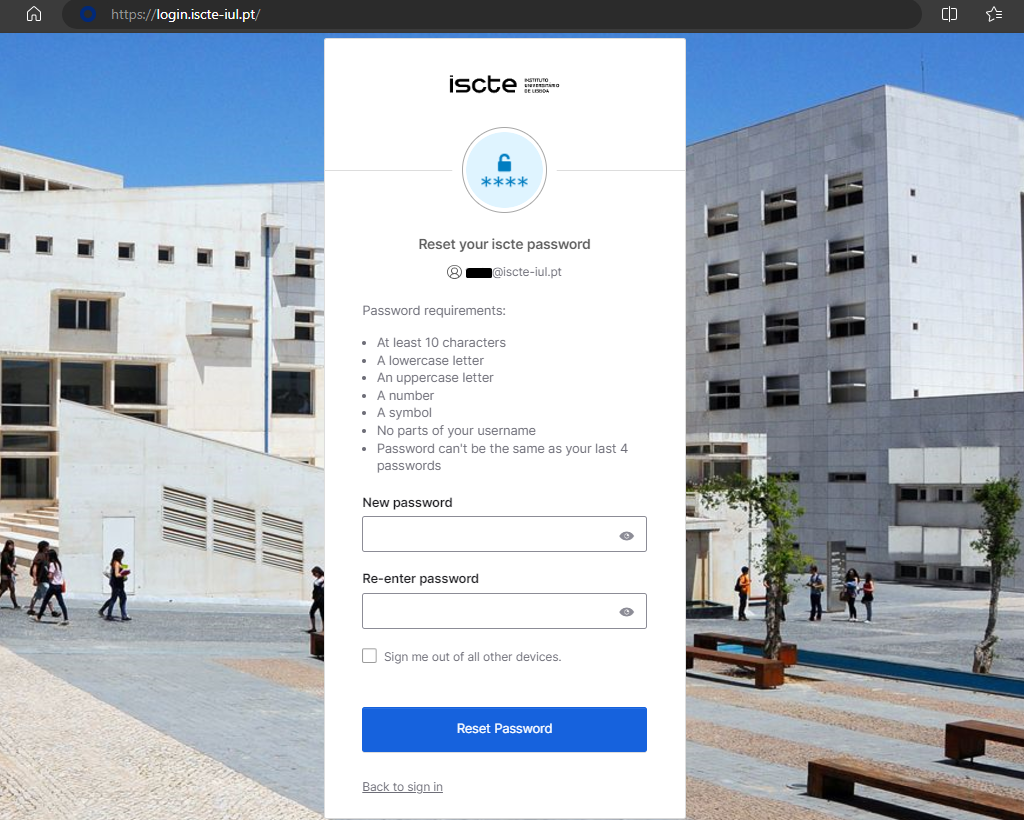
- Contain at least 10 characters.
- It must contain distinct characters from at least three of the following four categories:
- Unaccented uppercase character (‘A’ to ‘Z’)
- Unaccented lowercase character (‘a’ to ‘z’)
- Digits (0 to 9)
- Special or non-alphabetic characters (e.g. !, $, #)
- Must not contain characters considered illegal:
- ;
- ,
- ”
- ‘
- %
- *
- It must not be the same as your last 4 passwords.
- Must not contain the username (aka login).
- It must not contain the names you use, excluding particles with less than three characters.
I can’t connect to the VPN because I can’t use the MFA app. What should I do?
Atualizado/Updated: 2026-05-13
Target Audience: Iscte Community
Answer/Solution:
If you can’t connect to the VPN because you can’t access or use the MFA app (e.g. Okta Verify), check if:
-
- You have changed your phone or personal device.
- The Okta Verify app (or another authentication app, such as Google Authenticator) has been uninstalled.
- If the problem persists, please contact IT Support.
Further Information:
-
- Click here
How can I recover the password on Okta?
Atualizado/Updated: 2025-12-11
Target Audience: Iscte-IUL Community
Answer/Solution:
If you are already a member of the Iscte community (worker or student), perform the following steps:
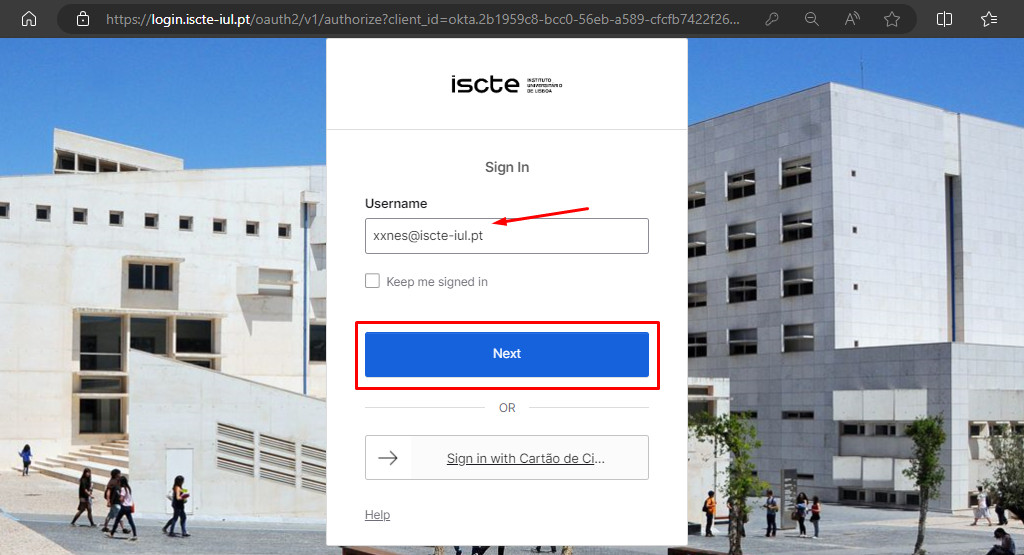
- Go to https://login.iscte-iul.pt/
- Enter your Iscte username (e.g. xxnes@iscte-iul.pt) and click “Next“.
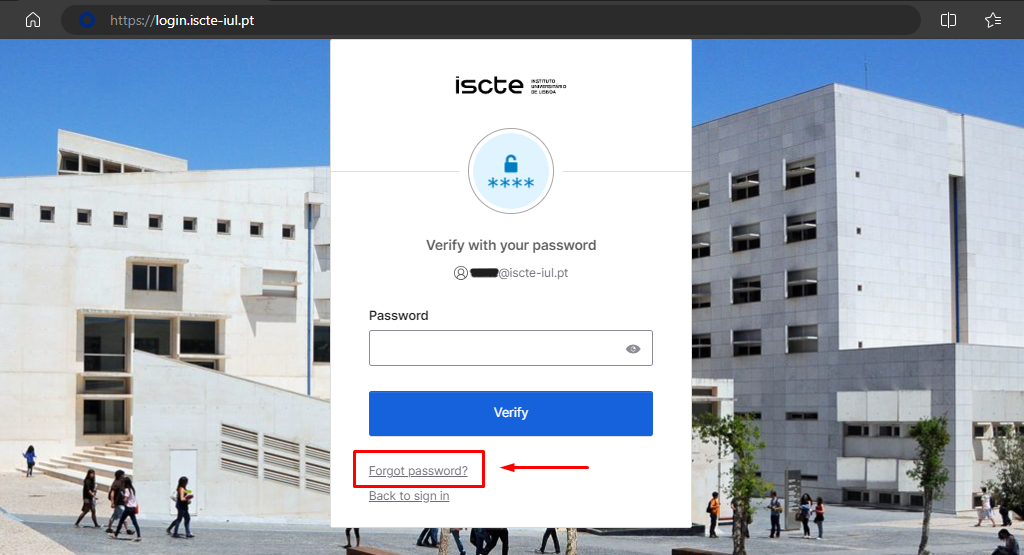
- Click on “Forgot password?“.
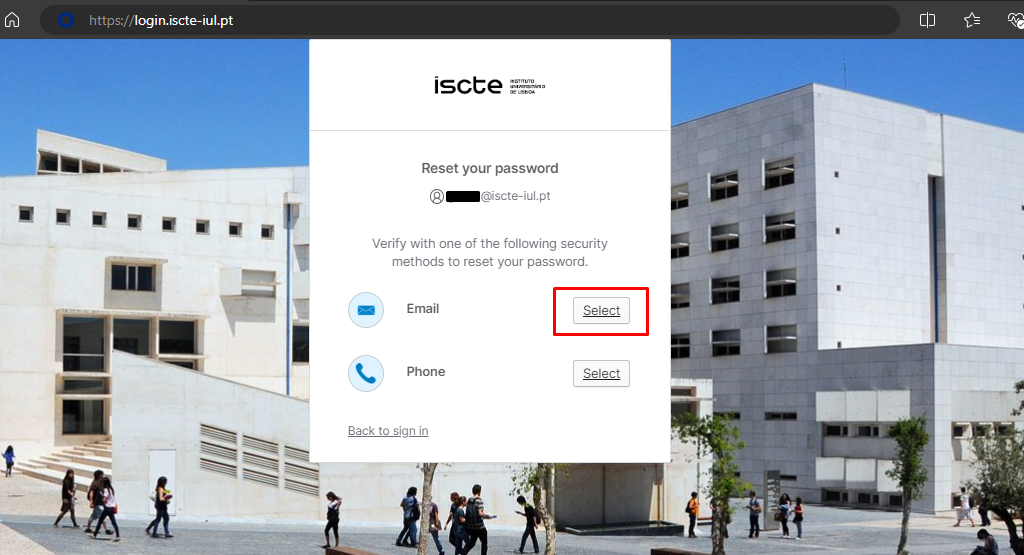
- Select the “Email” option to receive a password recovery e-mail to your personal e-mail address.
- Click on the ‘Send me an email’ button.
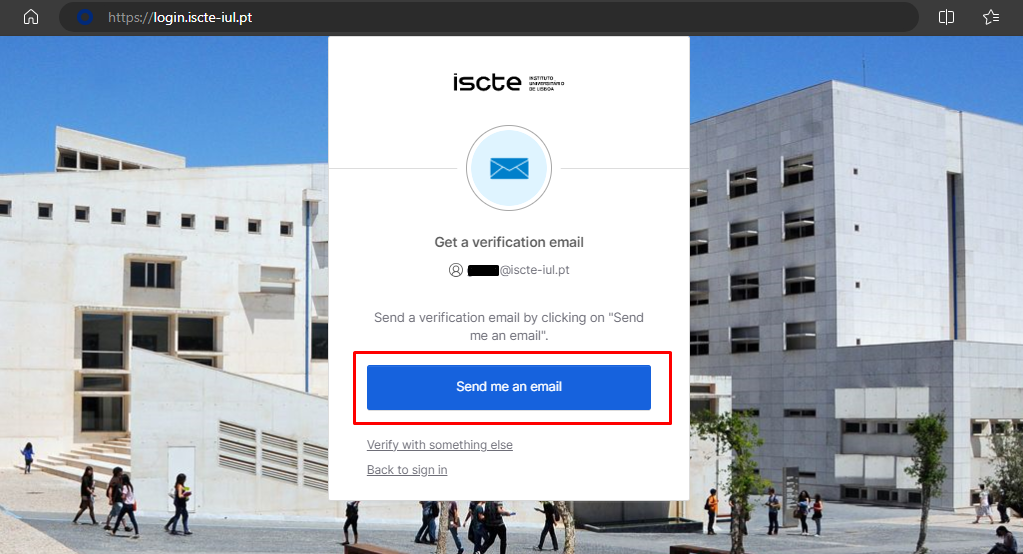
- Access your personal email account (which you have added to Okta).
- You will receive an automatic e-mail to your personal e-mail address from <noreply.login@iscte-iul.pt>, where you should click on the “Reset password” button.
Please note: The password reset link is only valid for 5 minutes.
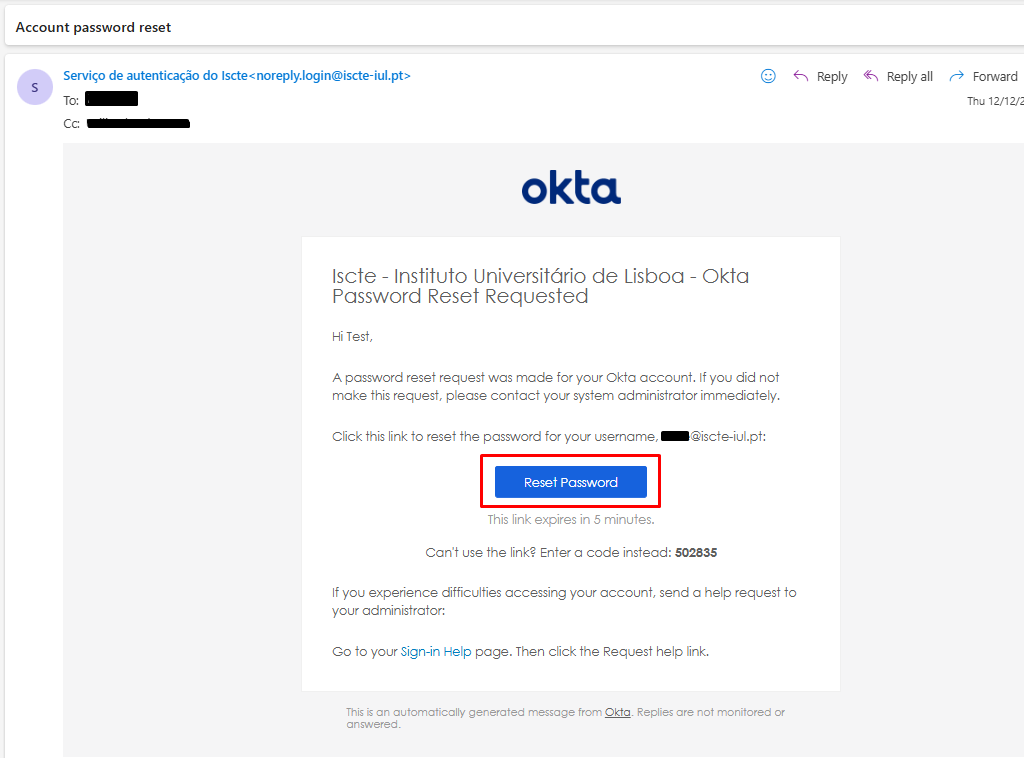
- A new login.iscte-iul.pt window will open in the default browser. Immediately change your password and then click on the “Reset password” button.