
Software
What are the differences between EViews University Edition and Student Lite?
Both versions use the same environment and the same essential econometric methods, but Student Lite is severely limited, while the University Edition offers almost all the capabilities of the professional version.
Price and Licensing
- Student Lite: Free, just request the serial number via the form.
- University Edition: Paid
Data Size Limitations (Workfile Limits)
- Observations and series
- University Edition: Up to 4 million observations per series (Windows) and up to 120 million (Mac).
- Student Lite: Maximum of 1,500 observations per series.
- Total Observations in File
- University Edition: Unlimited.
- Student Lite: Up to 15,000 total observations.
- Number of Objects
- University Edition: Unlimited.
- Student Lite: Maximum of 60 objects.
- Workfile Pages
- University Edition: Unlimited.
- Student Lite: Only 3 pages.
- Saving and Exporting Files
- University Edition: You can save and export files normally.
- Student Lite: Does not allow you to save workfiles or export data. (This is one of the most important restrictions.)
- Observations and series
Features and Integrations
- Programming (EViews Programs)
- University Edition: Yes.
- Student Lite: No.
- COM Automation / ODBC / Database Extensions
- University Edition: Supports various integrations, such as ODBC and EDX, depending on the system.
- Student Lite: Does not offer these integrations.
- Access to External Databases
- University Edition: Extensive support (e.g., FRED, ODBC, EDX).
- Student Lite: Only basic reading of some databases such as FRED.
- Programming (EViews Programs)
Technical Compatibility
- Both are 64-bit and run on Windows and macOS (Catalina+).
- Student Lite does not run on virtual machines.
- Both require periodic internet access.
What is Autodesk used for in an academic context?
EN
Autodesk software is useful for:
- Designing in 2D and 3D.
- Creating BIM models (e.g., Revit).
- Developing mechanical designs (e.g., Inventor, Fusion).
- Creating 3D animation and modeling (e.g., Maya, 3ds Max).
- Preparing high-quality professional portfolios.
What are the most commonly used Autodesk software programs among students
- AutoCAD – desenho técnico 2D/3D.
- Revit – arquitetura e BIM.
- Fusion / Fusion 360 – modelação mecânica e engenharia.
- 3ds Max – modelação e render.
- Maya – animação e efeitos visuais.
- Civil 3D – engenharia civil.
- More APPS…
Can I use Amos with data from SPSS?
Yes. Amos imports .sav files directly, which makes it easier when you have already performed analyses in SPSS.
Do I need to know advanced statistics?
A background in multivariate statistics helps, but you don’t need to be an expert. Amos has a graphical interface that makes it easy to create models.
How can I use Amos in Academic Work?
- Validate questionnaires (e.g., CFA – Confirmatory Factor Analysis).
- Test theoretical models.
- Assess relationships between variables (direct and indirect).
- Analyze mediation and moderation.
- Create structural models for theses, articles, and dissertations.
Is IBM SPSS available for the Linux operating system?
Target Audience: Iscte-IUL Community.
Answer/Solution: Version 27.0.1 of IBM SPSS was the last version supported for the Linux operating system.
Error in activating license in Amos and SPSS
Atualizado/Updated: 2025-10-28
Problem: If you receive this type of error when activating your IBM SPSS Statistics or IBM SPSS Amos license:
Authorization in progress … (***************)
Authorization failed.: Authorization Error
*** End Of Transaction.
One or more codes failed.
Click “Next” to license authorization via e-mail.
Resolution: Replace the “licenseactivator.jar” file located in the root folder of the software.
» Select your device’s operating system below and follow the steps to resolve the error.
- Close the SPSS/Amos software (it must not be running).
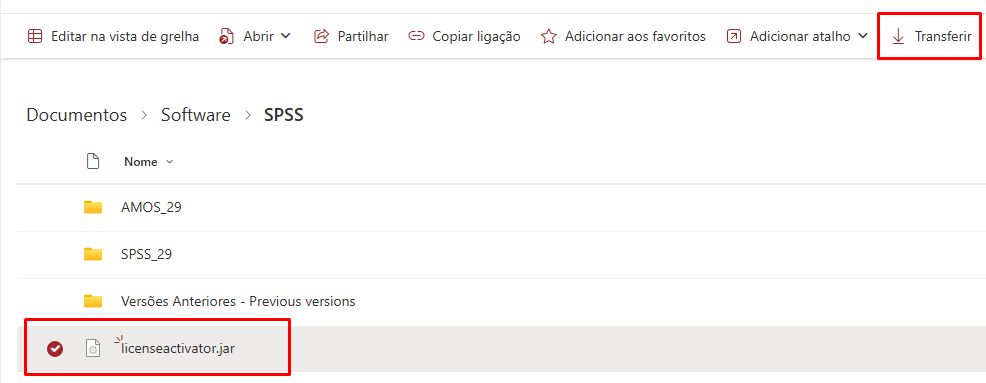
- Download the
licenseactivator.jarfile, which you can find here (just click on the licenseactivator.jar file or select the file and click on “Download”).
- Go to the folder where the program is installed. Open File Explorer (quick shortcut: Win + E).
Depending on the version installed, copy one of the paths below and paste it directly into the address bar at the top of the window:SPSS version licenseactivator.jar location 27 C:\Program Files\IBM\SPSS\Statistics\27 28 C:\Program Files\IBM\SPSS Statistics 29 C:\Program Files\IBM\SPSS Statistics AMOS version licenseactivator.jar location 27 C:\Program Files (x86)\IBM\SPSS\Amos\27 28 C:\Program Files\IBM\SPSS\Amos\28 29 C:\Program Files\IBM\SPSS\Amos\29 30 C:\Program Files\IBM\SPSS\Amos\30 
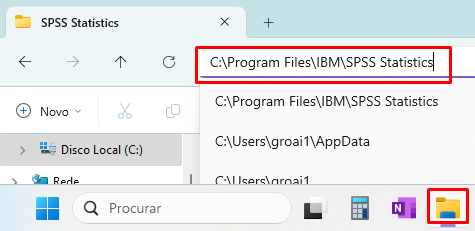
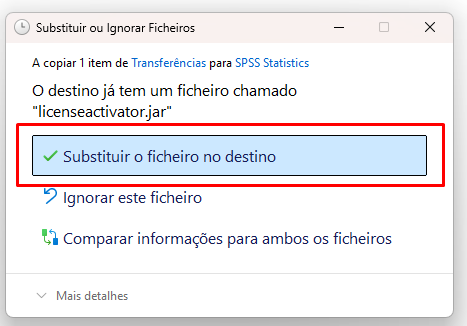
Example – SPSS Statistics - Copy the new file provided and paste it into the same folder, replacing the original.
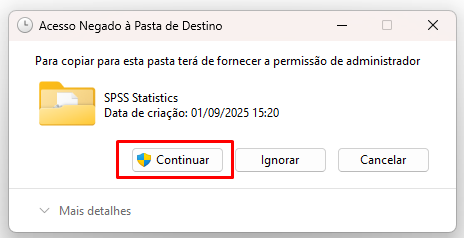
If a message appears asking for administrator permission, click Continue.
- Open IBM SPSS Statistics or IBM SPSS Amos.
- Re-enter the authorization code (code sent to activate the software license) and check that it works.
- Download the
licenseactivator.jarfile, which you can find here (just click on the licenseactivator.jar file or select the file and click on “Download”).
- Close all apps of the IBM SPSS Statistics software.
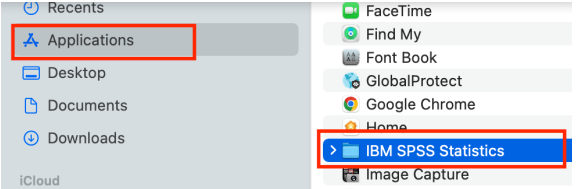
- Go to /Applications/IBM SPSS Statistics/SPSS Statistics.app
Right-click on the application icon
- Right-click on “Show Package Contents”
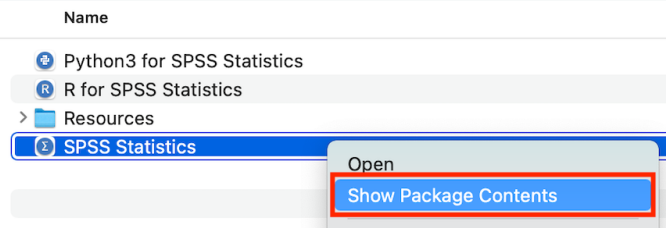
- Inside the Contents > bin folder, paste the downloaded licenseactivator.jar file and replace the old one.
- If a message pops up, confirm “Replace.”
- Open IBM SPSS Statistics.
- Re-enter the authorization code (code sent to activate the software license) and check if it works.
Can’t share OneDrive files
Atualizado/Updated: 2025-07-08
Target Audience: Iscte-IUL Community
Answer/Solution: If you can’t share files from OneDrive, it could be because:
-
- You’ve reached your sharing limits;
- You need to validate your account;
- The item is in your Personal Vault;
- OneDrive is not running;
- Your organisation has disabled or restricted the programme.
Shall I save files in OneDrive or SharePoint?
Atualizado/Updated: 2025-07-08
Target Audience: Iscte-IUL Community
Answer/Solution:
-
- If you’re working on a file in isolation, save it to OneDrive. Your OneDrive files are private unless you share them with others, which is particularly useful if you haven’t created a team yet.
- If you’re already working in a team – in Microsoft Teams, SharePoint, or Outlook – you should save your files where your team works, because OneDrive for work or school also connects you to all your shared libraries.
How can I validate my Office365 account?
Atualizado/Updated: 2025-07-08
Target Audience: Iscte-IUL Community
If you’re having problems sending share emails, it may be due to validation problems with your Microsoft Account.
Answer/Solution:
- Go to https://account.live.com/reputationcheck to validate your Microsoft account.
- Make sure your Microsoft Account Profile is up to date and complete.
- Make sure you accept the “Terms of Use“, if requested.
How do I share Onedrive files from my Personal Vault?
Atualizado/Updated: 2025-07-08
Target Audience: Iscte-IUL Community
Answer/Solution:
-
- As the items in your Personal Vault are private, they cannot be shared.
- If you want to share an item stored in your Personal Vault, you’ll have to transfer it to a folder outside your Personal Vault and share it from there.
How do I share if Onedrive isn’t installed or running?
Atualizado/Updated: 2025-07-08
Target Audience: Iscte-IUL Community
Answer/Solution: If the OneDrive desktop application is installed on your computer, you should see the “Share” option when you click on a file or folder in Explorer.
-
- If OneDrive is not running or the desktop application is not installed, you will not be able to share from File Explorer or the Finder.
- You can continue to share OneDrive files and folders from onedrive.com.
- If you don’t see the OneDrive icons in your taskbar or notification area, start OneDrive.
What is the difference between OneDrive and SharePoint?
Atualizado/Updated: 2025-07-08
Target Audience: Iscte-IUL Community
Answer/Solution:
-
- The similarities between the programs
-
- Sharepoint and OneDrive have similar cloud storage functions.
- Both offer enterprise-level protection and comply with the main data protection legislation.
-
- The main differences
-
- Sharepoint is a system for collaborative storage, focused on the needs of teams. OneDrive is a personal storage system, i.e. not collaborative.
- Sharepoint is a platform designed specifically to promote collaborative work in an online environment. It is a business environment in which employees share folders and files, including editing files simultaneously.
- Sharepoint’s usability is much broader than that of OneDrive, as it can be adapted to function as an intranet. It can also be integrated with Teams.
How can I uninstall Microsoft or Office 365?
Target Audience: All the world
Answer/Solution:
- Open the “Control Panel“:
- Press the Windows logo key, then type “control panel“.
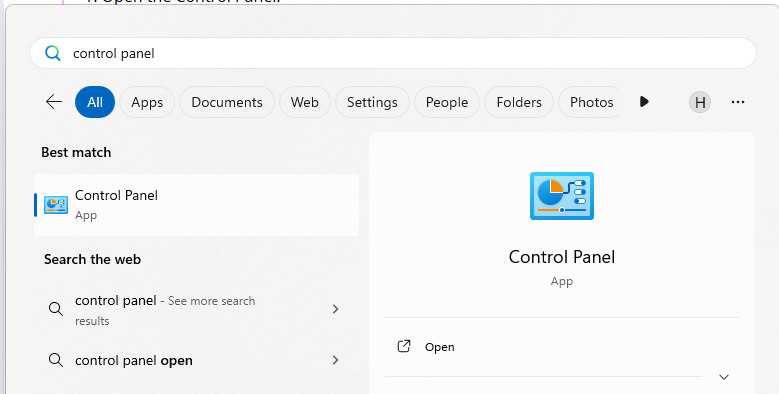
- Select “Control Panel” from the search results.
- Press the Windows logo key, then type “control panel“.
- Navigate to Programs and Features:
- Click on “Programs“, then “Programs and features“.
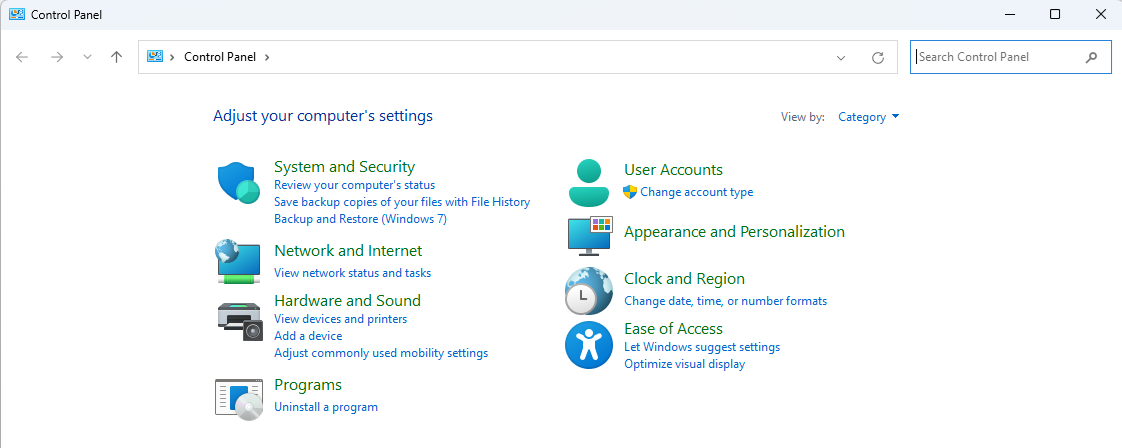
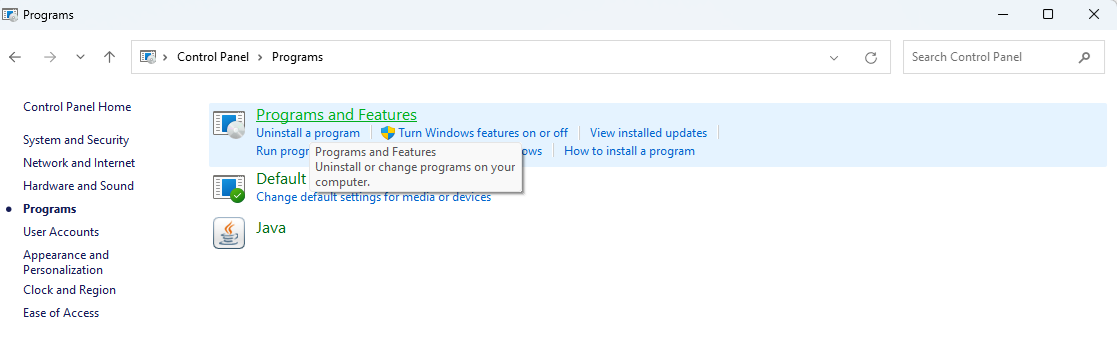
- Click on “Programs“, then “Programs and features“.
- Select the Office Product:
- Locate the Microsoft Office product you want to uninstall (e.g., “Microsoft 365”).
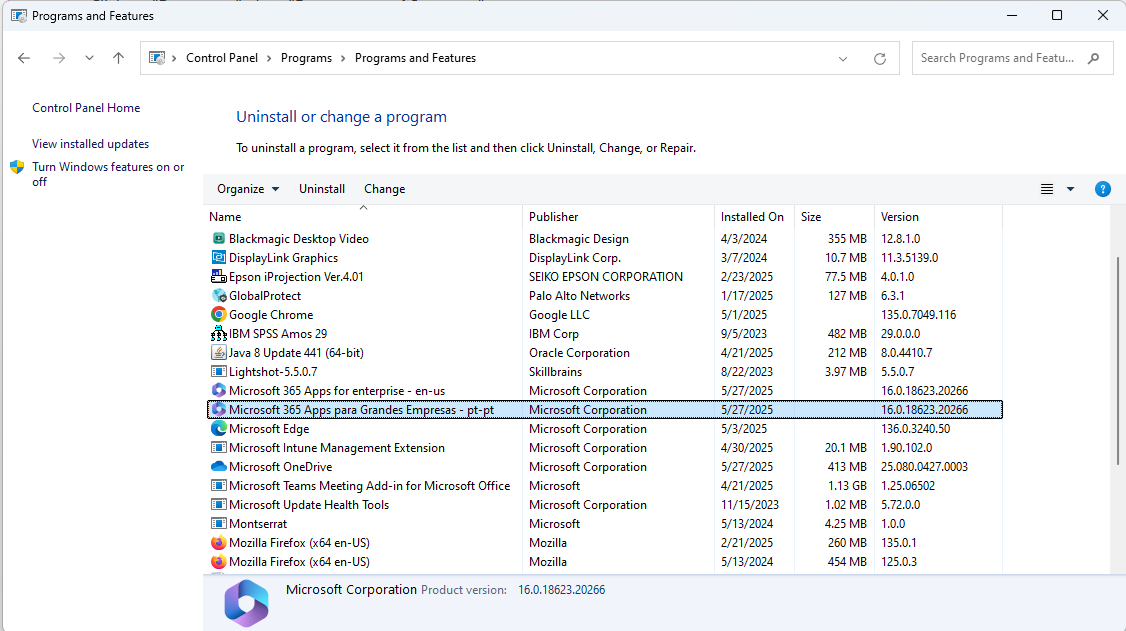
- If you installed Office as part of a suite (like Office Home and Student), search for the suite name. For standalone apps, search by the app name.
- Locate the Microsoft Office product you want to uninstall (e.g., “Microsoft 365”).
- Initiate the Uninstall:
- Click the “Uninstall” button.
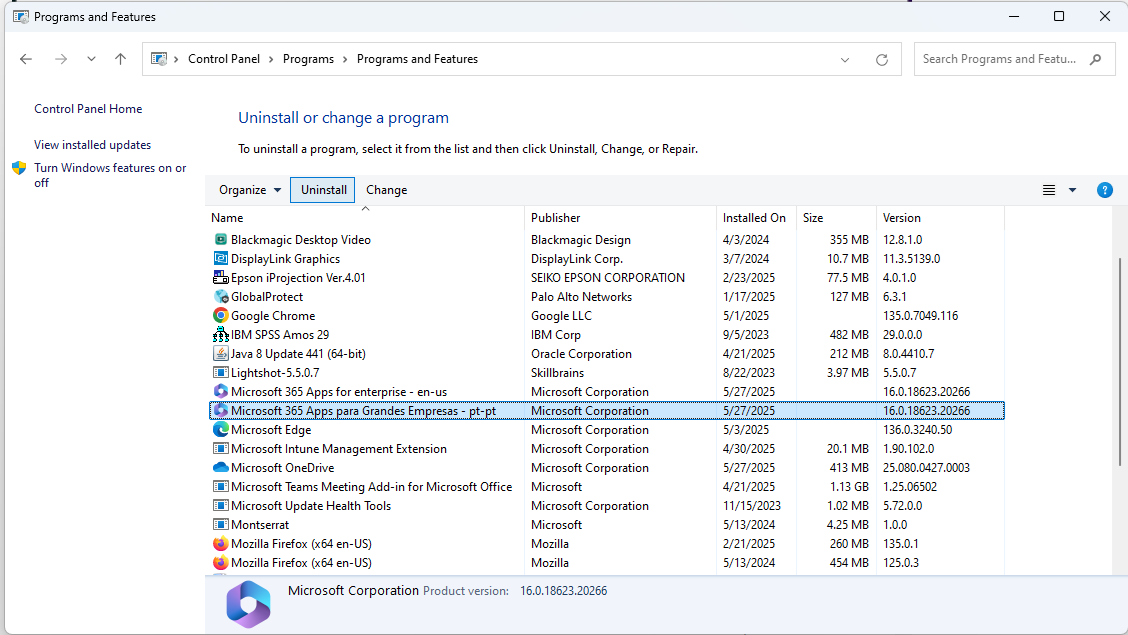
- Click the “Uninstall” button.
- Follow the Prompts:
- Follow the on-screen instructions to complete the uninstall process.
Further Information: To uninstall Office on macOS, open Finder, go to ‘Applications’, select the Office programms and move them to the trash.
Is IBM SPSS Amos available for the macOS operating system?
Atualizado/Updated: 2025-12-18
Target Audience: All the world
Answer/Solution: No.