
Printing error – Windows Hello
Target Audience: Iscte Employees
Answer/Solution:
For users who have configured PIN or fingerprint authentication – Windows Hello – and were unable to print (error 0x000006ba), follow these steps:
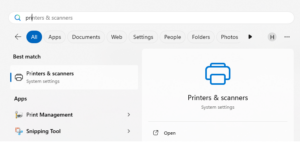
- Access the “Printers & Scanners” menu using the Windows search box.
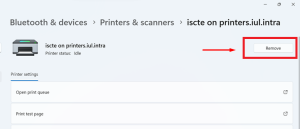
- Select the printer and press the “Remove“.
- Establish a connection to the Iscte print server by running the command \\printsrv-vwx.iul.intra in the Windows search box.
Tip: Outside Iscte installations, connect to the VPN before attempting to connect to the Iscte print server.
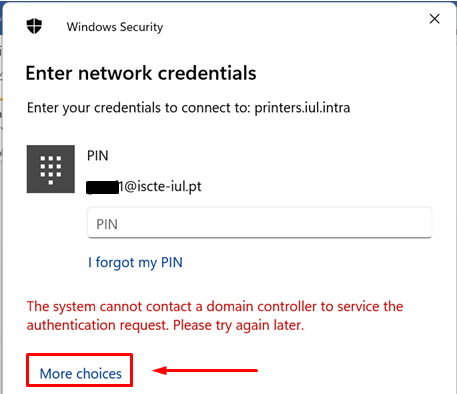
- In the Windows Security window, click on “More choices“.
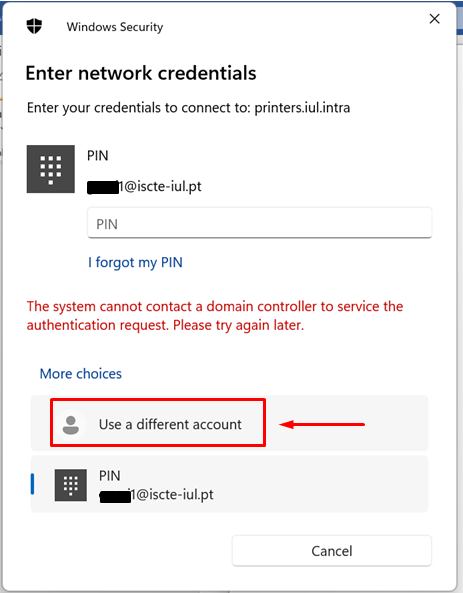
- Select “Use a different account“.
- Authenticate to the print server and select “Remember my credentials“.
Username: Type “IUL\username” (e.g., IUL\xxnes)
Password: Type Iscte account password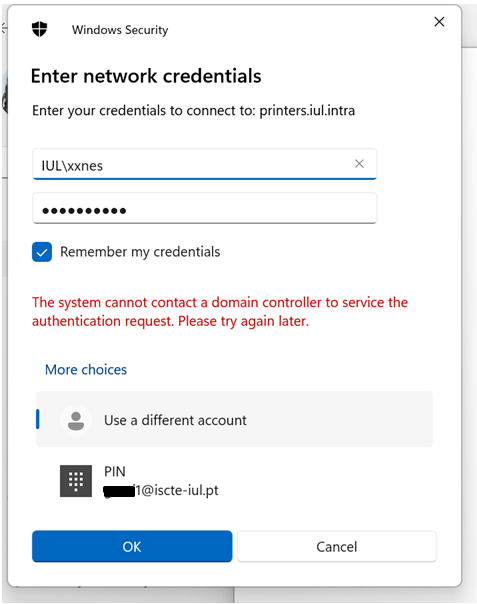
- Press the OK button.
- Install the Iscte network printer driver using the right mouse button and choosing the Connect… option and wait for the installation to finish.
- Access the “Printers & Scanners” menu using the Windows search box.
Further Information:
See also:
- Printing and Scanning (overview)