
How do I set up a VoIP account in Jitsi?
Target Audience: Iscte Employees
This setup allows you to use the Iscte phone extension through the Jitsi app. To do so, you must:
- Open the Jitsi app.
- In the “File” menu, select the “Add new account…” option.
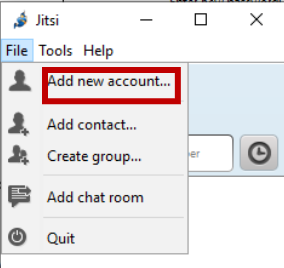
- Under “Network,” select SIP.
- In the “SIP ID” field, enter the current extension followed by 1@voip.iscte-iul.pt.
- Example:
Extension » 290000
SIP ID » 2900001@voip.iscte-iul.pt
- Example:
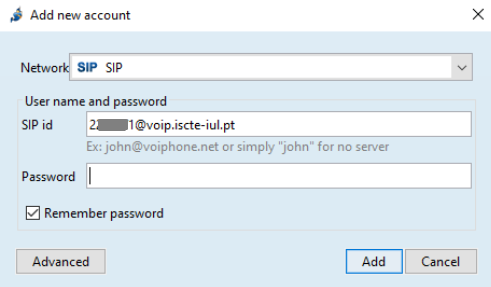
- In the password field, enter your VoIP access password. Information about your credentials can be found at:
- Click “Add” to complete the setup.
Additional Information:
See also: