Skip to content Skip to main navigation Skip to footer

Educast

PT

Educast is a service provided by FCCN (Fundação para a Computação Científica Nacional) that allows users to record, edit, and publish educational videos. It serves as a repository for educational content, making it easier for the academic community to create and share multimedia resources.

With Educast, you can:

    • Record lessons or presentations.
    • Edit videos online.
    • Publish content in a simplified manner on the web.

For further information, please contact FCCN here.

1. How do I Access Educast?

  1. Access the Educast platform at https://educast.fccn.pt/.
  2. Click on the “Login” button in the upper right corner of the browser window.
  3. Perform federated authentication (SSO) using the Iscte account credentials (e.g., xxnes@iscte-iul.pt and its password).

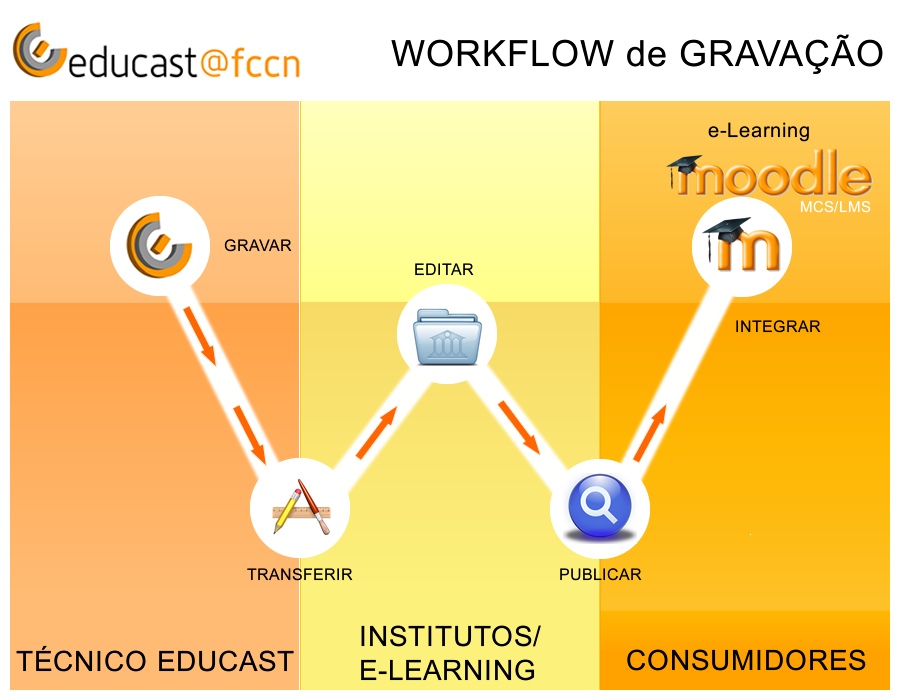
2. Workflow

3. How do I Record or Upload Videos to Educast?

    • Videos are captured through a Recorder, which allows you to synchronously record audio, video and data.
    • Additionally, external videos can also be imported through a web video upload interface, present in the Educast Manager (e.g. recording a Zoom session).


3.1 Educast Recorders

Compatible with various operating systems

MacOS

4. How do I Edit Videos in Educast?

After recording the videos are uploaded to the Educast Manager, where you can store, manage, administer and edit the videos submitted to the platform.

    • Importing external videos via web interface or Recorder Educast
    • Online video editing via browser
    • Metadata customization (Title, subtitle, speaker, location, date, description, tags)
    • Creating chapters for key moments of presentation
    • Branding customization (cover image, header image, pre-roll video)
    • Multi-format export to the web and mobile devices

5. How do I Publish Videos on Educast?

The final video delivery formats (streaming, desktop and mobile) can be easily downloaded, viewed and shared via the web.

    • Internet and intranet
    • Email
    • Social Networks
    • LMS (Learning Management Systems)
      • Moodle, Blackboard, Canvas and Sakai

6. The Educast Portal

7. Learn More...

8. User Support

FCT|FCCN

9. FAQ