Skip to content Skip to main navigation Skip to footer

MAXQDA

PT

MAXQDA

MAXQDA is a comprehensive software tool designed for qualitative and mixed‑methods data analysis. It supports a wide range of data types, including text, images, audio, video, and social media content such as YouTube comments and Tweets. The software provides advanced coding and analysis features, allowing users to apply codes, colors, symbols, and emojis to organize information.

Its AI Assist tool enhances efficiency through automatic transcription and subcode suggestions. MAXQDA also integrates quantitative data for mixed‑methods research. With an intuitive interface, tutorials, and an active community, it is easy to learn.

Note: The MAXQDA Plus 2022 version is available only until 10/31/24.

How to Get Maxqda?

    • Get the Windows version here
    • Get the MacOSX version here

How to Install Maxqda?

  1. Run the installation file:
    • Windows: MAXQDA24_Setup.msi
    • MacOSX: MAXQDA24.dmg
  2. Click on “Next“.
  3. Click on “Install“.
  4. Click on “Finish“. 

How to Get & Activate a Maxqda License?

  1. Enable the VPN, unless you are connected to Iscte’s cable network.
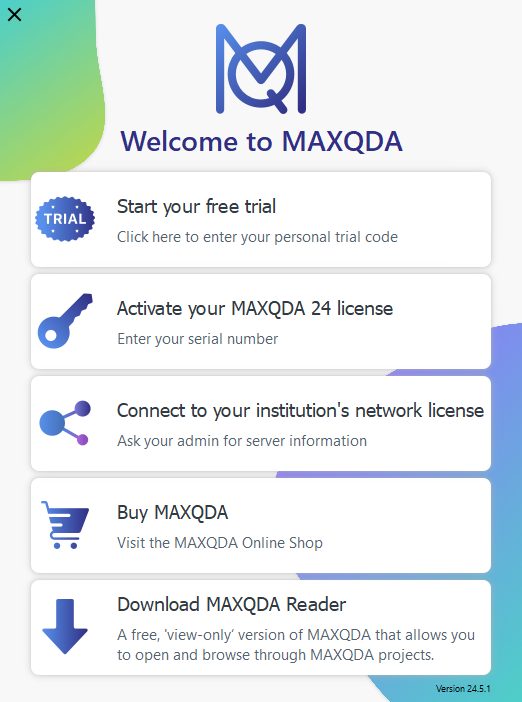
  2. Launch MAXQDA. Choose the option “Connect to your institution’s network license“.
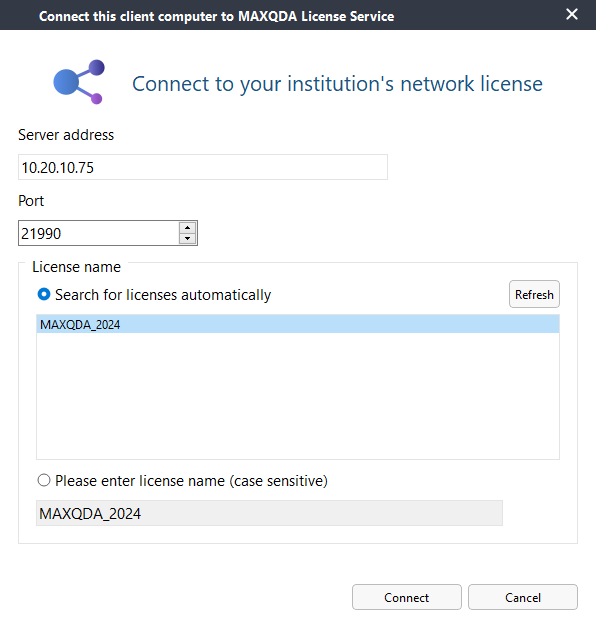
  3. Fill in the fields below and click on “Refresh” and then on the “Connect” button.


Add-on AI Assist Free

To access AI Assist Free Add-on you need to create a free MAXQDA account using your Iscte username (e.g. xxnes@iscte-iul.pt). More information here.

Learn More...

FAQ